Google Business Profile: A Complete Guide to Optimizing Your Local Presence
Having a strong Google presence is no longer optional—it’s a necessity. If you run a local business—whether it’s a professional practice, a store, a restaurant, or a beauty salon—appearing at the top of search results and on Google Maps can make the difference between getting a call… or going unnoticed.
Business Profile is the free tool that Google provides to help you do just that: get found by the right people, right when they’re looking for what you offer.
In this guide, we’ll explain clearly and thoroughly what a Google Business Profile is, how to create and optimize it, and how to use it to achieve tangible results in terms of visibility, reputation, and customers.
Table of Contents
What is Google Business Profile, and why is it essential?
The Google Business Profile —which you may know as Google My Business —is much more than just a “listing” on Google. In fact, we can consider it a strategic tool for telling people who you are, where you are, what you offer, and, above all, for building trust through content, reviews, and updates.
Its origins date back to Google Places and Google+ Local, but over the years it has evolved into the beating heart of local visibility on Google Search and Maps. For many businesses, it is the first point of contact with a potential customer.
Think about it: when you search for a dentist in Milan or a pizzeria in Florence, the first results you see are often Business listings with addresses, hours, photos, and reviews. That’s where it all comes down to. If you’re not there (or if you’re not there the right way), you’re leaving customers to your competitors.
Why should every local business have (and optimize) its own Google Business profile?
Having a complete and up-to-date profile on Google allows you to:
- Increase visibility in local search results and on Google Maps
- Build credibility with reviews, photos, posts, and accurate information
- Interact with customers by answering questions and managing reviews
- Generate concrete actions, such as phone calls, reservations, and in-person visits
And all of this is free. But keep in mind: only a profile that’s been carefully crafted down to the smallest detail will yield real results. It’s not enough just to be there—you need a strategic approach.
Do you want your business to appear among the top results on Google Maps?
An optimized Google Business profile is the first step toward being visible, credible, and chosen.
If you don’t have the time or want to avoid mistakes, we can help you manage it effectively, in accordance with health regulations and SEO best practices.
How do I create a Google Business Profile from scratch?
What you need to get started
First of all, you need an active Google account. Next, gather the following information:
- Official name of the business
- Address (or the service area, if you work by appointment)
- Phone number, website, hours of operation
- Main category (e.g., “Beauty salon,” “Veterinarian,” “Accountant”)
If you work from home, you can hide your address and show only the area where you work.
How to create a profile
- Go to google.com/business
- Click “Manage Now”
- Enter your name, category, and address
- Add your contact information
- Proceed with verification (required to activate your profile)
Pay attention to this category: it’s strategic
The main category has a significant impact on visibility. Choose it carefully. You can also add subcategories, but don’t overdo it. The more specific you are, the better Google will understand who to show your content to.
Profile Verification: How It Works and Why It's Essential
Your profile won't be active until it's verified. Based on the information you provide, Google will suggest the most appropriate verification method:
- Postcard: You will receive a code to enter
- Phone call or text message: available for certain categories
- Video: What's New in 2025. Requires displaying signage, facilities, and documents via a mobile app
Verification is what allows Google to confirm that you are the actual owner. Without this step, your profile will remain invisible.
Active profile, but few results?
Just having a presence isn’t enough: you need a strategy, consistency, and a thorough understanding of the tool.
Let’s review your Google Business profile together and show you how to improve it to attract more patients in your area.
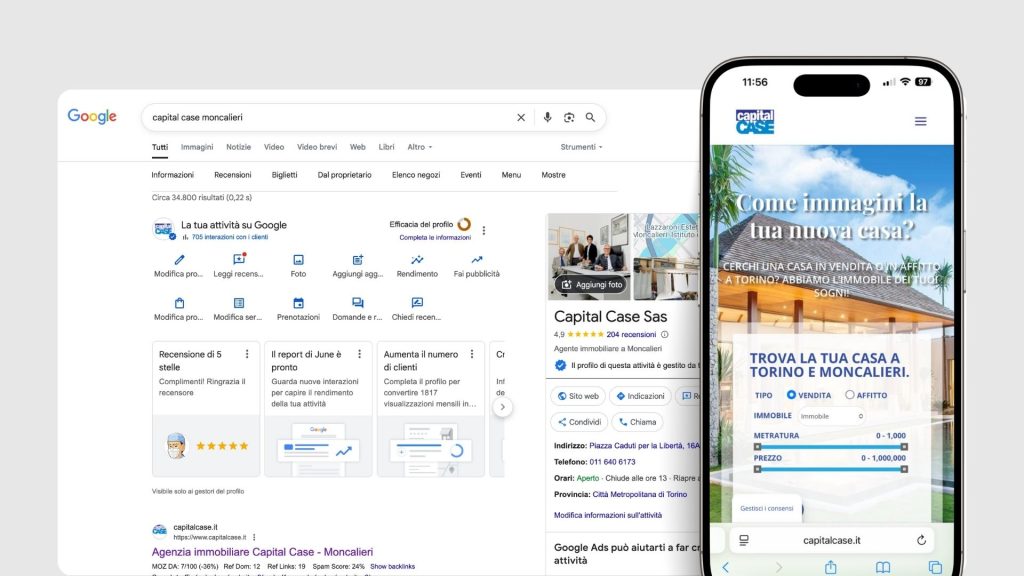
How can you truly optimize your Google Business Profile?
1. Describe your business as best as you can
You have 750 characters to describe who you are and what you do. Don’t waste them. Be clear, use local keywords, and explain your approach as well.
Example:
“We are a dental practice in Turin specializing in implantology and invisible orthodontics. We welcome both adults and children, offering state-of-the-art technology and personalized care.”
2. Images and visual content are important
Images make all the difference. Use original, bright photos that reflect your brand: exterior shots and signage, interior shots, your team at work, details, and the overall atmosphere.
3. Schedules, attributes, additional information
Enter your actual hours, including holidays and special opening times. Adding attributes such as “accessible restroom,” “LGBTQ+ friendly,” and “women-owned” not only boosts your visibility but also reflects your values.
Local SEO: The Real Driving Force Behind Your Google Business Profile
Google displays activities based on three main criteria:
- Relevance: How relevant are you to the search performed?
- Distance: How close are you to the user's location?
- Visibility: how “well-known” you are—that is, reviews, online mentions, links, and active presence
How can you improve your ranking?
- Post weekly updates ( special offers, news, blog posts)
- Use the Q&Asection (you can post questions too!)
- Optimize every field in your profile—don't leave anything to chance
- Always respond to reviews thoughtfully and respectfully
Reviews are the heart of your online reputation
People trust other people, which is why a review is more effective than any advertisement.
- 93% of users read reviews before choosing a business
- Google considers them a quality signal and rewards them in its rankings
How can you effectively collect reviews?
There’s no need to force it: what’s needed is a method.
- Ask her in person after a positive experience
- Send a message with the direct link
- Use a QR code that can be scanned on-site
- Automate the process using your business management software or CRM
How to respond to reviews
- When the reviews are positive, it’s much easier: thank the customer by name and use a natural, genuine tone.
- If the reviews are negative: never get into an argument. Show that you’re listening, be empathetic, and invite the user to discuss the matter further in private.
A well-handled review can turn a dissatisfied customer into an advocate for your business. It’s an investment in trust and reputation.
Online reputation: not just on Google Business Profile, but elsewhere as well
Reviews aren't limited to those left directly on your profile. In some cases, Google also displays ratings from external platforms: Miodottore, Facebook, TripAdvisor, and other reputable sites.
To make this happen:
- The information (name, address, phone number) must be exactly the same across all channels.
- The external website must be well-ranked and reliable.
A consistent reputation across multiple channels strengthens your firm’s credibility and also improves your Google rankings.
Images on Google Business Profile: How to Present Yourself Effectively and Professionally
Images aren’t just a nice-to-have: they’re often the first visual impression users get of your business. Even before reading a review or visiting your website, people searching for you on Google look at the photos in your profile. And in just a few seconds, they form an impression of who you are and what you offer.
For this reason, it’s essential to pay as much attention to the images you post on your Google Business Profile as you would to the window display of your office, store, or clinic.
Technical requirements: formats, dimensions, aspect ratios
To ensure good visual quality and proper indexing by Google, it is important to follow certain technical guidelines.
| Type | Accepted file formats | Recommended dimensions | Proportions | Maximum weight |
|---|---|---|---|---|
| Profile photo | JPG, PNG | 720 x 720 pixels | Square (1:1) | 5 MB |
| Cover photo | JPG, PNG | 1024 x 575 pixels | Landscape (16:9) | 5 MB |
| Additional photos | JPG, PNG | 1200 x 900 pixels | Horizontal orientation is preferred | 5 MB |
| Video | MP4 | Minimum resolution: 720p | Any | 30 sec / 75 MB |
Always choose clear, well-lit images without filters or distracting graphic effects. Visual authenticity conveys professionalism and credibility.
What images should you post, and why?
An effective profile is one that conveys the identity and value of your business at a glance. The images should be consistent, representative of the services you offer, and capable of inspiring trust.
- Exterior shots of the business: photos of the facade, the sign, and the main entrance. These are essential for helping people recognize your business once they arrive and for conveying a neat and professional image.
- Interiors and spaces: Show the reception area, treatment rooms, common areas, and waiting rooms. The images should be clean, inviting, and realistic. Avoid empty or neglected spaces.
- Team at work: Including photos of staff engaged in their daily activities (with their consent) helps humanize the brand and reassure potential customers. The photos should be candid, not posed, and consistent with the work environment.
- Equipment and technology: Showcasing the equipment used helps convey innovation, safety, and quality. However, make sure the visuals are clear: each image must be placed in context.
- Clients: Images of patients or clients may only be posted if they have provided written consent. When handled properly, this practice can help build trust and foster a perception of transparency.
Mistakes to Avoid
- Using blurry, outdated, or low-quality images.
- Upload only the logo as the main photo (which, on its own, conveys very little).
- Using stock photos or impersonal, easily recognizable, and often generic images.
- Add images with filters, graphic overlays, frames, or promotional text.
- Forgetting to update the photos when renovating the rooms.
Recommended update frequency
It is good practice to update images at least every six months, or whenever a significant change occurs ( renovation, new service, technological upgrade, or expansion of staff). A visually polished and up-to-date profile conveys attention to detail, dynamism, and consistency with the business’s actual operations.
Not sure if your profile is really effective?
Have you entered all your information, but you’re not showing up in the top results? Do you have reviews, but not much engagement?
Maybe it’s time for a complete check-up of your Business Profile.
Using posts: not just “offers”
Posts on your Google Business Profile aren’t just simple updates: they’re content that helps the algorithm understand your business, improves local SEO, and drives engagement. They can be used to:
- Announce new services.
- Share blog content.
- Post events, initiatives, or screening campaigns.
- Indirectly answer patients' FAQs.
Please note: Standard posts visible and highlighted for up to 6 months, while “Offer” or “Event” posts remain visible until the set expiration date. Post consistently: frequency and updates are essential for keeping your profile active and well-ranked.
Questions and Answers (Q&A): An Opportunity to Be Seized Wisely
One of the least-used—but most powerful—features of your Business Profile is the Q&A section. It’s a public space where users can ask questions… and anyone, including other users, can respond. That’s right: even people outside your business. That’s why it’s essential not to leave it unattended.
What can you actually do?
- Take the initiative to add some frequently asked questions yourself, along with clear and reassuring answers.
- Check this section regularly to make sure that new questions are answered correctly —and, above all, that others aren’t providing incorrect or vague answers.
- Use the answers to clarify practical details about your service (e.g., “Do you make house calls on Saturdays?”, “Can I pay by card?”).
Maintaining this section is an excellent way to anticipate users' needs and strengthen credibility and transparency—two key values that should not be overlooked.

Live chat: useful, but only if you manage it well
Google lets you enable an instant messaging feature: basically, users can message you directly from your profile using the Google Business App.
At first glance, it seems like a convenient tool. And it is. But only if it’s used carefully and responsibly. So, before you activate it, ask yourself:
- Is there a staff member available to respond promptly during business hours?
- Can I handle these requests without violating advertising regulations (for example, in the case of healthcare advertising)?
- Can I provide only practical information (schedules, access details, reservations) and avoid giving remote advice?
If the answer is yes, go ahead and do it. Otherwise, it’s better to leave it alone: a silent chat is worse than no contact at all.
Google Business Profiles and user-uploaded photos: be mindful of what they show (and who sees them)
Did you know that customers can also upload photos to your Google profile? It happens all the time: they might take a photo of the entrance, the waiting area, or the treatment. Well… or maybe not.
Why is this an aspect that shouldn't be underestimated?
- Some images may not accurately represent your environment or your service.
- In other cases, they may be out of context, unclear, or even misleading.
- Sometimes they are posted without your approval, but they are still visible to everyone.
What can you do?
- Check the “User Photos” section regularly.
- Report any that are irrelevant, offensive, or damaging to the firm’s reputation to Google.
- Instead, highlight the positive ones: if a patient has uploaded a nice photo of the waiting room or reception area, you can repost it on your social media channels (obviously only with their permission).
Visual consistency helps build patient trust even before they set foot in your practice.
Google Business Profile and custom links: make it easy for users to take action
Your Google profile isn't just a place to introduce yourself—it's also a direct gateway to your services. That's why you can (and should) add custom links to make it easier to perform your most common tasks.
For example:
- A link to book an appointment or consultation online.
- A direct link to the contact page or the information request form.
- A link to a specific service, if you sell services online (e.g., consulting, courses, beauty services).
Placing these links in the right spots reduces friction and boosts conversions. Because when someone is ready to book, they shouldn’t have to search too long.
Changes "suggested" by Google: check them and take action
Google allows users to suggest changes to your profile: hours, address, phone number, and category. It does this to keep the information up to date.
The problem? Sometimes these changes are incorrect. And if you don't review and reject them in time, they may be published automatically.
What can you do to prevent damage?
- Log in to the dashboard regularly (at least once a week).
- Check if there are any pending changes.
- Accept only the correct ones; firmly reject the incorrect ones.
A small oversight can jeopardize your visibility… or worse, cause you to lose the trust of a patient who comes across incorrect information.
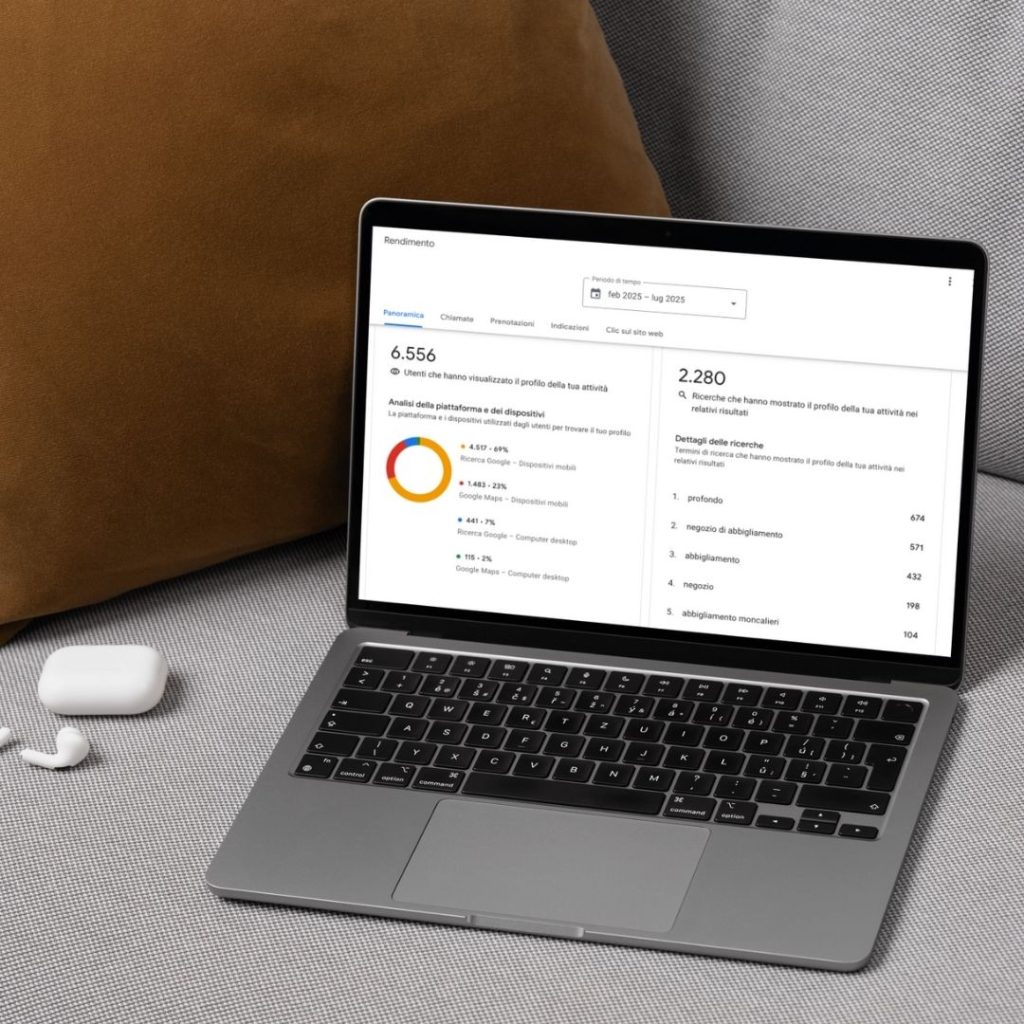
Performance and analysis: what isn't measured can't be improved
The "Performance" section of your profile provides valuable information:
- Which keywords make your business appear in the search results?
- How many users clicked, called, or asked for directions.
- On which days and at what times is traffic heaviest?
All of this data helps you understand what works, where you can improve, and when to publish content to maximize its impact.
Please be aware of health regulations
Last but not least, a necessary reminder: if you work in the medical or healthcare sector, everything you post on your Business Profile must comply with legal regulations and the code of ethics.
So avoid:
- Sensationalist or misleading statements.
- Discounts, urgent medical needs, or guaranteed results.
- Calls to action that are too pushy (“Book now or miss out”).
Instead, go for:
- Clarity, transparency, and fairness.
- Verifiable and reliable information.
- A professional and reassuring tone.
A well-crafted profile isn't just about visibility—it's a matter of responsibility toward your patients.
Would you like to learn more about communication in the healthcare sector?
Check out our new article
Google Business Profile: Advanced Features and What's New in 2025
In recent months, Google has introduced a series of very useful updates, especially for businesses that manage multiple locations or want to automate certain processes.
- Business Profile Manager for multi-site operations: centralized management, custom roles, aggregated dashboards
- Video assessment: a new assessment method for selected categories
- AI features: post suggestions, automated replies, predictive analytics
- Integration with WhatsApp Business: direct chat button and click tracking
- New priorities: sustainability, accessibility, and inclusivity—factors that are becoming increasingly important to consumers
Google Business Profile isn't just a listing—it's a dynamic, powerful, and free tool to help grow your business locally. But, like any tool, it works best when used wisely.
When managed effectively, it becomes a catalyst for visibility, a booster of trust, and a direct bridge between you and your future customers.
Have you starteda new business or moved locations? Make sure people can find you right away
The moment you open or relocate your business is crucial: appearing on Google Maps with accurate, up-to-date information can make the difference between getting noticed… or going unnoticed.
We’ll help you set up and optimize your Google Business profile from day one.